CodeRabbit logoCodeRabbit logo
PlanEnterpriseCustomersPricingBlog
Resources
  • Docs
  • Trust Center
  • Contact Us
  • FAQ
  • Whitepapers
Log InGet a free trial
CodeRabbit logoCodeRabbit logo

Products

Pull Request ReviewsIssue plannerIDE ReviewsCLI ReviewsOSS

Navigation

About UsFeaturesFAQSystem StatusCareersDPAStartup ProgramVulnerability Disclosure

Resources

BlogDocsChangelogCase StudiesTrust CenterBrand GuidelinesWhitepapers

Contact

SupportSalesPricingPartnerships

By signing up you agree to our Terms of Use and Privacy Policy

discord iconx iconlinkedin iconrss icon
footer-logo shape
Terms of Service Privacy Policy

CodeRabbit Inc © 2026

CodeRabbit logoCodeRabbit logo

Products

Pull Request ReviewsIssue plannerIDE ReviewsCLI ReviewsOSS

Navigation

About UsFeaturesFAQSystem StatusCareersDPAStartup ProgramVulnerability Disclosure

Resources

BlogDocsChangelogCase StudiesTrust CenterBrand GuidelinesWhitepapers

Contact

SupportSalesPricingPartnerships

By signing up you agree to our Terms of Use and Privacy Policy

discord iconx iconlinkedin iconrss icon

最もリクエストの多かったCodeRabbit機能の1つ:マルチリポジトリ分析の紹介

by
Atsushi Nakatsugawa

Atsushi Nakatsugawa

March 09, 2026

|

1 min read

March 09, 2026

1 min read

  • Multi-Repo Analysisのご紹介
  • セットアップと設定
  • 実際の動作について
  • 今すぐ試す
Back to blog
Cover image

Share

https://victorious-bubble-f69a016683.media.strapiapp.com/Reddit_feecae8a6d.pnghttps://victorious-bubble-f69a016683.media.strapiapp.com/X_721afca608.pnghttps://victorious-bubble-f69a016683.media.strapiapp.com/Linked_In_a3d8c65f20.png

Cut code review time & bugs by 50%

Most installed AI app on GitHub and GitLab

Free 14-day trial

Get Started

Catch the latest, right in your inbox.

Add us your feed.RSS feed icon
newsletter decoration

Catch the latest, right in your inbox.

Add us your feed.RSS feed icon

Keep reading

A very brief history of AI coding, from Copilot to next-gen agents

A very brief history of AI coding, from Copilot to next-gen agents

How code models became coding assistants, how assistants became agents, and how the practice of software engineering began to reorganize around them.

Meet CodeRabbit Plan: Better plans. Faster delivery. Less rework

Meet CodeRabbit Plan: Better plans. Faster delivery. Less rework

The challenge Teams using coding agents need prompts that are clear, specific and context-aware. That's exactly why we built CodeRabbit Plan, a collaborative planning tool that turns vague ideas into

Gemini 3.1 Pro for code-related tasks: More focus, higher signal-to-noise

Gemini 3.1 Pro for code-related tasks: More focus, higher signal-to-noise

In practice, developers experience AI code review through the comments it leaves on pull requests: how often it finds real issues, how much noise it produces, and how actionable its feedback is. To an

The one thing devs will still read when they stop reading code

The one thing devs will still read when they stop reading code

Code was never meant to be read. We just had no alternative. Consider a real-world example: a production payments service with layered retry logic, idempotency keys, circuit breakers, feature flags, a

Get
Started in
2 clicks.

No credit card needed

Your browser does not support the video.
Install in VS Code
Your browser does not support the video.

The most requested CodeRabbit feature: Multi-Repo Analysisの意訳です。

すべてのチェックをパスし、レビューでも問題なさそうに見えたプルリクエストをマージしたら、10分後にダウンストリームのサービスが壊れてしまった...という経験があれば、この問題をすでにご存知でしょう。

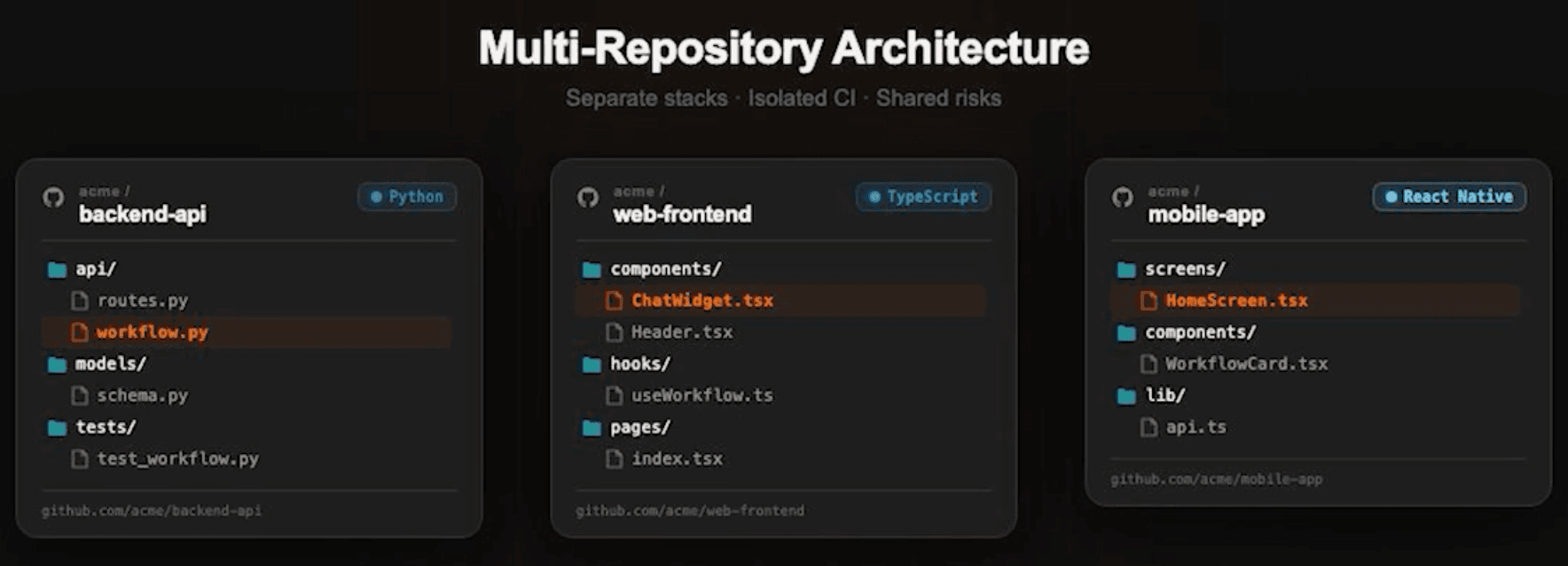
アーキテクチャが複数のリポジトリにまたがっている場合(マイクロサービス、共有ライブラリ、フロントエンドとバックエンドの分離など)、ある場所での変更が、別の場所で静かに破壊を引き起こすことがあります。APIレスポンススキーマのフィールド名を変更した場合はどうでしょうか?PRでは問題なく見えますが、そのレスポンスをパースしている3つのサービスにおいて何が起こるのか知る由もありません。

これは、マルチリポジトリ構成で運用しているチームから最もよく聞く課題の一つであり、お客様から最もリクエストの多かった機能の一つです。

そこで、私たちはそれを解決できるマルチリポジトリ分析機能を構築しました。
Multi-Repo Analysisのご紹介

Multi-Repo analysis(マルチリポジトリ分析)は、ProおよびEnterpriseティアユーザー向けの新しいCodeRabbitの機能です。この機能により、関連するリポジトリを接続して、コードレビュー中にCodeRabbitがすべてのリポジトリからコンテキストを引き出すことができます。マイクロサービス、共有ライブラリ、APIコントラクトの変更、あるいは1つのリポジトリでの変更が別のリポジトリを静かに壊す可能性があるあらゆる構成を想定しています。

プルリクエストが共有API、型定義、またはデータベーススキーマを変更すると、CodeRabbitは自動的にリンクされたリポジトリを探索して、ダウンストリームへの影響を調査します。

変更を単独でレビューするのではなく、マージする前に全体像を把握できます。
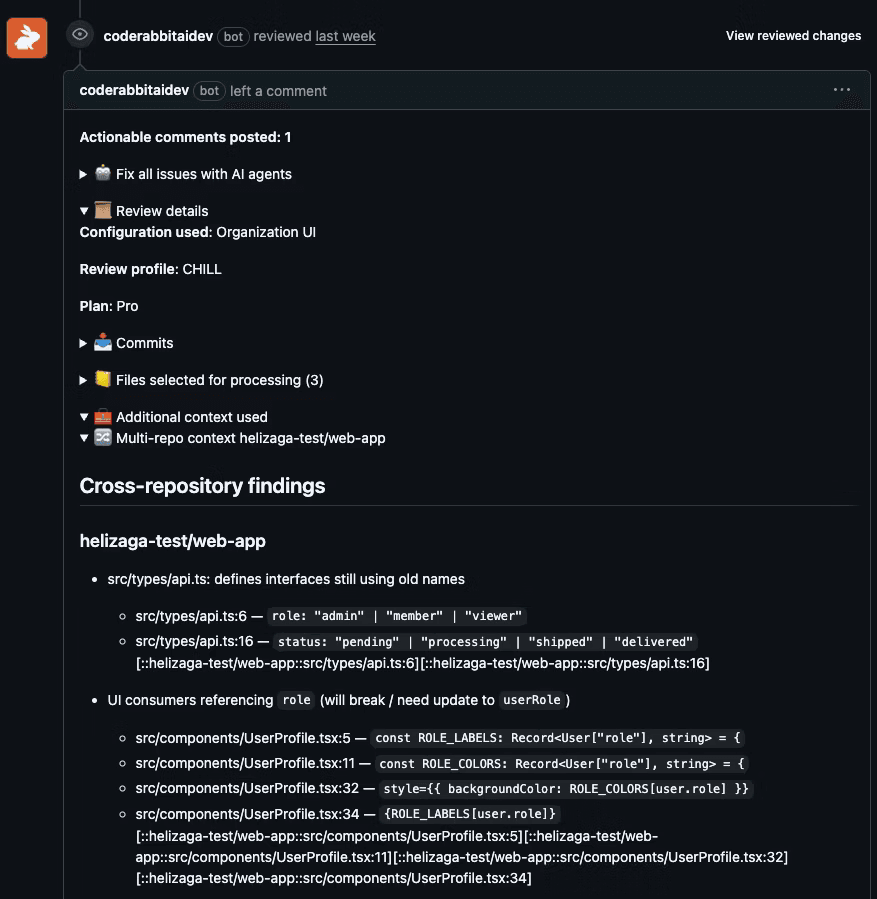
セットアップと設定

使用を開始する前に、CodeRabbitボットがすべてのリンクされたリポジトリへの読み取りアクセス権を持っていることを確認するために、いくつかのプラットフォーム固有の要件を確認する必要があります。

プラットフォーム

要件

GitHub

CodeRabbit GitHub Appがすべてのリンクされたリポジトリにインストールされている必要があります。アクセスできないリポジトリはスキップされ、レビューサマリーに警告が表示されます。

GitLab

ボットトークンが読み取りアクセス権を持っている必要があります。トークンは通常、グループまたはインスタンスにスコープされています。

Bitbucket Cloud

ボットトークンが読み取りアクセス権を持っている必要があります。トークンはワークスペースにスコープされています。

Azure DevOps

PATが読み取りアクセス権を持っている必要があります。トークンは組織にスコープされています。

設定が完了したら、2つの方法でセットアップを完了できます。

  • CodeRabbit Webインターフェースから

    • Repositoriesセクションに移動し、リンクされたリポジトリを追加したいリポジトリを選択します

    • Use Organization Settings トグルをオフに切り替えます

    • Knowledge Baseに移動し、Linked Repositoriesセクションを見つけてください

    • レビュー中にCodeRabbitをガイドする指示と共に、新しいリンクされたリポジトリを追加します
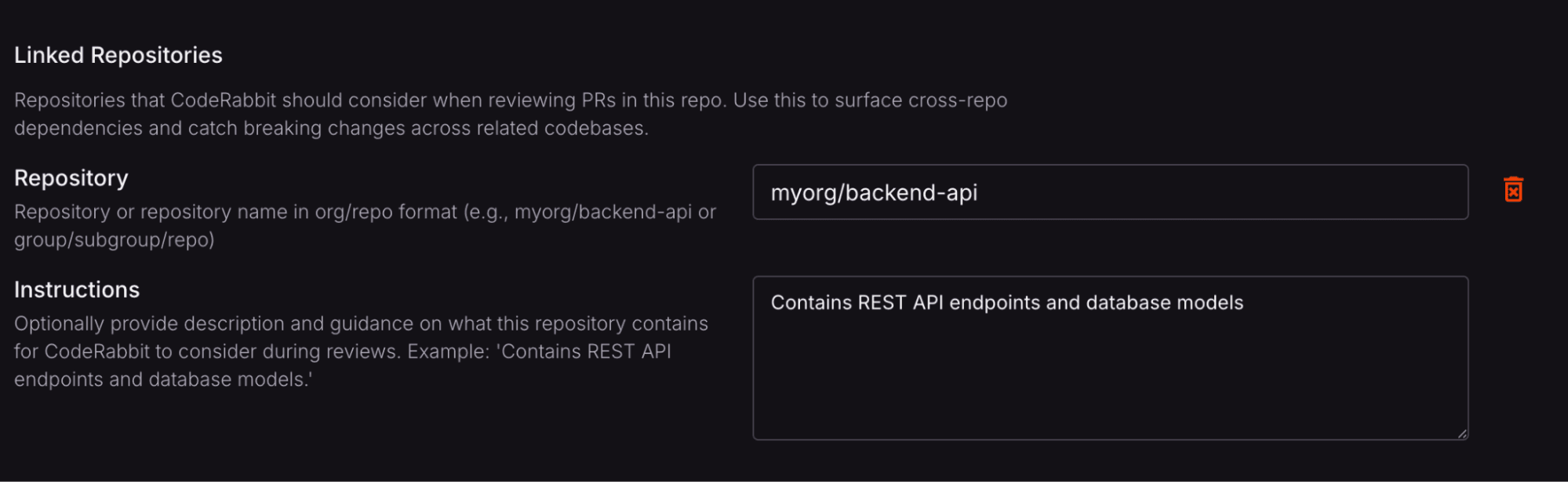
  • YAML設定ファイルから

    • .coderabbit.yamlファイルのknowledge_baseの下にlinked_repositoriesセクションを追加します
# yaml-language-server: $schema=https://coderabbit.ai/integrations/schema.v2.json
knowledge_base:
  linked_repositories:
    - repository: "myorg/backend-api" # リポジトリ名
      instructions: "Contains REST API endpoints and database models" # リポジトリに関する説明

現時点では、各リポジトリの設定は1つのリンクされたリポジトリのみをサポートしていますが、将来的には複数のリンクされたリポジトリがサポートされる予定です。完全なセットアップの詳細については、ドキュメントを確認してください。

実際の動作について

実際に動作するウォークスルーとして、Developer Advocateの一人が、Multi-Repo analysisがレビューで実際のクロスリポジトリの問題を検出する様子を示すチュートリアルを作成しています。

https://youtu.be/BrT4rSHhA10?si=FzPUzcBUgqXdHXmZ

今すぐ試す

Multi-Repo analysis機能は本日より利用可能です。リポジトリを接続し、PRを開いて、CodeRabbitに見逃していた要件を見せてもらいましょう。

今すぐ始める