CodeRabbit logoCodeRabbit logo
プランエンタープライズカスタマー料金表ブログ
リソース
  • ドキュメント
  • トラストセンター
  • お問い合わせ
  • FAQ
  • ホワイトペーパー
ログイン無料試用を開始
CodeRabbit logoCodeRabbit logo

プロダクト

プルリクエストレビューIDE レビューCLI レビューオープンソース

ナビゲーション

私たちについて特徴FAQシステムステータス採用データ保護附属書スタートアッププログラム脆弱性開示

リソース

ブログドキュメント変更履歴利用事例トラストセンターブランドガイドライン

問い合わせ

サポートセールス料金表パートナーシップ

By signing up you agree to our Terms of Use and Privacy Policy

discord iconx iconlinkedin iconrss icon
footer-logo shape
利用規約プライバシーポリシー

CodeRabbit Inc © 2026

CodeRabbit logoCodeRabbit logo

プロダクト

プルリクエストレビューIDE レビューCLI レビューオープンソース

ナビゲーション

私たちについて特徴FAQシステムステータス採用データ保護附属書スタートアッププログラム脆弱性開示

リソース

ブログドキュメント変更履歴利用事例トラストセンターブランドガイドライン

問い合わせ

サポートセールス料金表パートナーシップ

By signing up you agree to our Terms of Use and Privacy Policy

discord iconx iconlinkedin iconrss icon

Introducing Usage-Based Add-On. Allow unrestricted access to CodeRabbit CLI through agentic coding loops.

by
Konrad Sopala

Konrad Sopala

March 11, 2026

3 min read

March 11, 2026

3 min read

  • What's New
  • Getting Started
  • Give it a try
Back to blog
Cover image

共有

https://victorious-bubble-f69a016683.media.strapiapp.com/X_721afca608.pnghttps://victorious-bubble-f69a016683.media.strapiapp.com/Linked_In_a3d8c65f20.pnghttps://victorious-bubble-f69a016683.media.strapiapp.com/Reddit_feecae8a6d.png

他の記事を読む

Vercelの情報漏洩がエンタープライズのコードセキュリティにもたらす教訓

Vercelの情報漏洩がエンタープライズのコードセキュリティにもたらす教訓

盗まれたOAuthトークンがVercelの内部システムを侵害しました。この開発者サプライチェーン攻撃から、すべてのエンタープライズが学ぶべき3つのセキュリティ上の教訓を解説します。

IDEはもはやソフトウェア開発の中心ではない

IDEはもはやソフトウェア開発の中心ではない

IDEはもはやソフトウェア開発の中心ではありません。CodeRabbit Agent for SlackのようなAI搭載オペレーショナルインターフェースが、エンジニアリングワークフローをどのように変革し、コンテキストスイッチを削減し、開発者の生産性を再定義しているかを紹介します。

OpenAI GPT-5.5の変更点:より優れた判断力・強力なコーディング・高品質なシグナル

OpenAI GPT-5.5の変更点:より優れた判断力・強力なコーディング・高品質なシグナル

CodeRabbitによるGPT-5.5のベンチマーク結果は、コードレビューの精度向上、シグナルの質の改善、実際のワークフローでのパフォーマンス向上を示しています。

CodeRabbit now supports unlimited reviews using CLI, helping you to perfect code while running your agentic coding loops with Claude code, Codex and more!

Buy credits, use them at your own pace, and get full control over your CLI usage - right from the CodeRabbit web interface.

What's New

From now on, you can purchase credits to get unrestricted access to CodeRabbit CLI. There are two options available:

  • One-Time Purchase - Buy credits on demand and pay only for what you need and when you need it. Can turn on/off Auto-refill here.

  • Auto-refill (set it and forget it) - Configure a refill threshold and top-off amount, so your CI pipelines and CLI workflows never stall because of an empty balance.

  • Monthly Subscription - Set up a recurring credit top-up and never worry about running out of your credits. You can cancel your subscription any time.

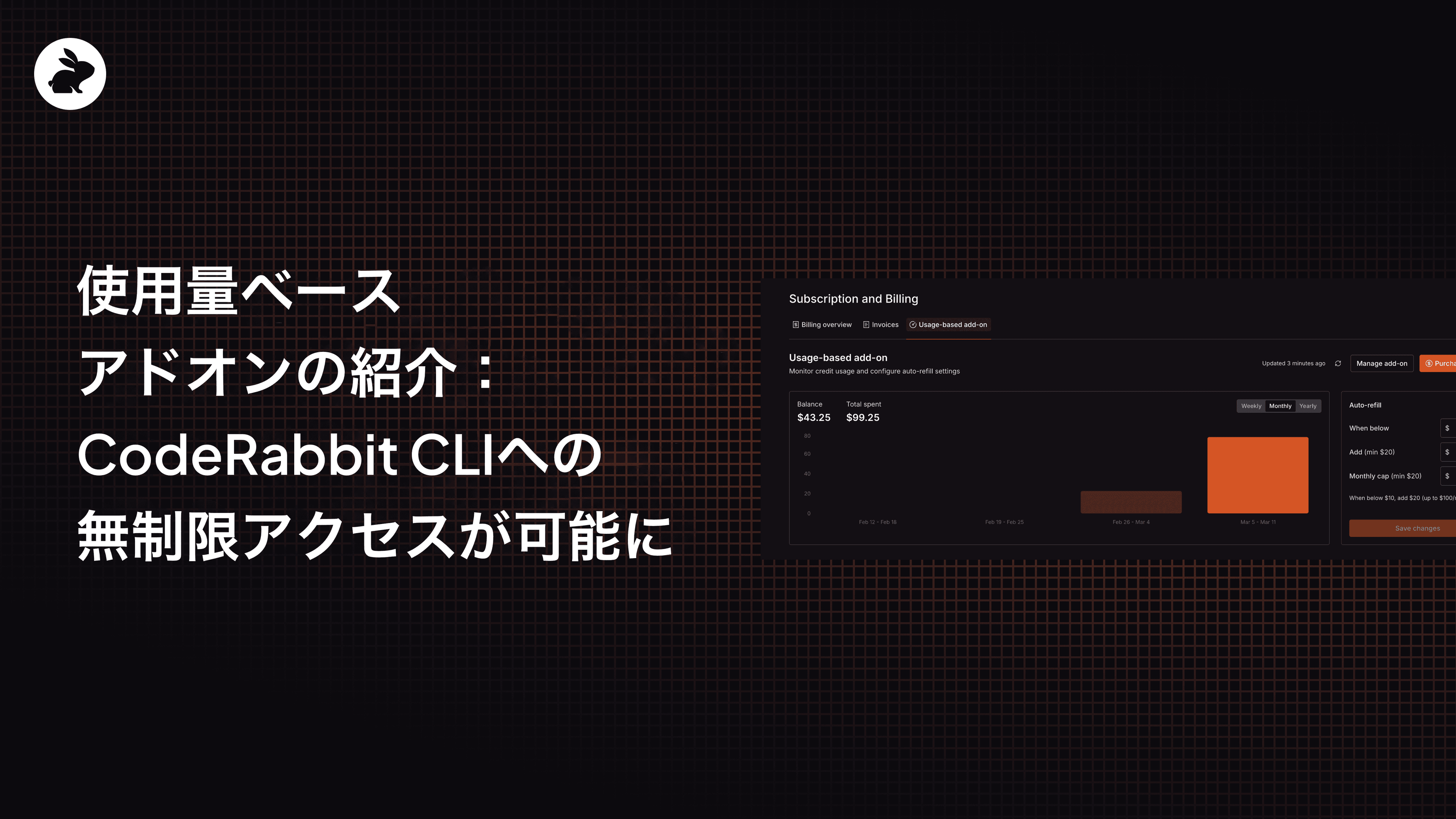
Once you start using your credits, you’ll want to know where you stand. The Usage-Based Add-On tab gives you real-time visibility into your credit spend, showing your current balance alongside a spending chart.

Credits are simple: $1 gets you one credit, and each reviewed file costs $0.25.

Getting Started

Here’s a step-by-step setup guide:

  • Install CodeRabbit CLI

    • Follow the instructions here or simply run this command in your terminal and follow along.
curl -fsSL https://cli.coderabbit.ai/install.sh | sh
  • Choose your purchase method

    • Head to Account Settings in the CodeRabbit web interface and find Subscription and Billing. You’ll see the Usage-based add-on tab there, where you can choose between a monthly subscription, a one-time purchase or auto-refill.
  • Create an Agentic API Key

    • Once your purchase is complete, navigate to the API Keys section and generate your Agentic API key.
  • Run CodeRabbit via your AI Agent

    • Prompt your agent to run a CodeRabbit CLI code review using the following command:
coderabbit –plain --api-key cr-***********
  • To avoid passing the key on every command, prompt your agent to authenticate once with your CodeRabbit API key using the following command:
coderabbit auth login --api-key cr-************

After logging in, prompt your agent to run a CodeRabbit CLI review without passing the API key again:

coderabbit review --plain

Give it a try

https://youtu.be/bMItn3G_upQ?si=D5mJu_tFUzXM7N7N

Ready to have unlimited CLI reviews? Head to the CodeRabbit web interface and grab some credits. Whether you go with a one-time purchase or set up a monthly subscription, you'll be up and running in minutes.

And if you run into anything or have feedback, let us know. We're building this for you.