CodeRabbit logoCodeRabbit logo
特徴エンタープライズカスタマー料金表ブログ
リソース
  • ドキュメント
  • トラストセンター
  • お問い合わせ
  • FAQ
ログイン無料試用を開始
CodeRabbit logoCodeRabbit logo

プロダクト

プルリクエストレビューIDE レビューCLI レビュー

ナビゲーション

私たちについて特徴FAQシステムステータス採用データ保護附属書スタートアッププログラム脆弱性開示

リソース

ブログドキュメント変更履歴利用事例トラストセンターブランドガイドライン

問い合わせ

サポートセールス料金表パートナーシップ

By signing up you agree to our Terms of Use and Privacy Policy

discord iconx iconlinkedin iconrss icon
footer-logo shape
利用規約プライバシーポリシー

CodeRabbit Inc © 2026

CodeRabbit logoCodeRabbit logo

プロダクト

プルリクエストレビューIDE レビューCLI レビュー

ナビゲーション

私たちについて特徴FAQシステムステータス採用データ保護附属書スタートアッププログラム脆弱性開示

リソース

ブログドキュメント変更履歴利用事例トラストセンターブランドガイドライン

問い合わせ

サポートセールス料金表パートナーシップ

By signing up you agree to our Terms of Use and Privacy Policy

discord iconx iconlinkedin iconrss icon

Top 5 AI Code Generation Tools

by
Aravind Putrevu

Aravind Putrevu

April 11, 2024

|

7 min read

April 11, 2024

7 min read

  • 1. CoPilot by GitHub
  • 2. Replit GhostWriter
  • 3. Amazon CodeWhisperer
  • 4. Cody by Sourcegraph
  • 5. Cursor
  • The impact of AI is just beginning
Back to blog
Cover image

共有

https://victorious-bubble-f69a016683.media.strapiapp.com/X_721afca608.pnghttps://victorious-bubble-f69a016683.media.strapiapp.com/Linked_In_a3d8c65f20.pnghttps://victorious-bubble-f69a016683.media.strapiapp.com/Reddit_feecae8a6d.png

他の記事を読む

Copilotから次世代エージェントまで ― AIコーディングの歴史を振り返る

Copilotから次世代エージェントまで ― AIコーディングの歴史を振り返る

From Copilot to agents: The history of AI codingの意訳です。 AIコーディングエージェントの歴史は、誰もそれをエージェントと本格的に呼ぶ前から始まっています。2017年、論文「Attention Is All You Need」がTransformerアーキテクチャを発表し、現代の大規模言語モデルを実現可能にしました。 2020年には、CodeBER

CodeRabbit Planの紹介:良い計画で高速な開発、そして少ない手戻りを実現

CodeRabbit Planの紹介:良い計画で高速な開発、そして少ない手戻りを実現

Meet CodeRabbit Plan: Better plans. Faster deployments.の意訳です。 課題 コーディングエージェントを使用するチームには、明確で具体的かつコンテキストを意識したプロンプトが必要です。その課題を解決するため、私たちはCodeRabbit Planを構築しました。CodeRabbit Planはアイデア、チケット、またはテキストプロンプトのいずれか

コード関連タスクにおけるGemini 3.1 Pro:より集中的で、高いS/N比

コード関連タスクにおけるGemini 3.1 Pro:より集中的で、高いS/N比

Gemini 3.1 Pro for code-related tasksの意訳です。 実際のところ、開発者はプルリクエストに残されたコメントを通じてAIコードレビューを体験します。つまり、実際の問題をどのくらいの頻度で見つけるか、どのくらいノイズを発生させるか、そしてそのフィードバックがどの程度実行可能かです。 これらの質問に答えるため、GoogleのGemini 3.1 Proと、CodeRa

開発者がコードを読まなくなった後に、唯一読み続けるもの

開発者がコードを読まなくなった後に、唯一読み続けるもの

What devs will still read when they stop reading codeの意訳です。 コードは決して「読まれるため」に存在していたわけではありません。私たちには単に他に選択肢がなかっただけです。 現実世界の例を考えてみましょう。本番環境の決済サービスには、多層的なリトライロジック、冪等性キー、サーキットブレーカー、フィーチャーフラグ、そしてミドルウェアを通じて織り

With the advent of generative AI in the past year, the field of software development has profoundly changed. AI has significantly eased the coding process for professionals, streamlining complex tasks and enhancing efficiency. Now, even experienced developers can leverage AI to quickly generate code, boosting productivity and allowing more time for intricate problem-solving and innovation.

Seasoned professionals can quickly stub out APIs in seconds. Beginners have a partner available 24/7 for code reviews and assessments. Even non-developers can release entire applications as long as they can sufficiently describe what they want in a prompt.

There are several AI code generation tools on the market and new ones are appearing every day, each with unique features and capabilities. Let’s take a look at some of the best and most popular options.

1. CoPilot by GitHub

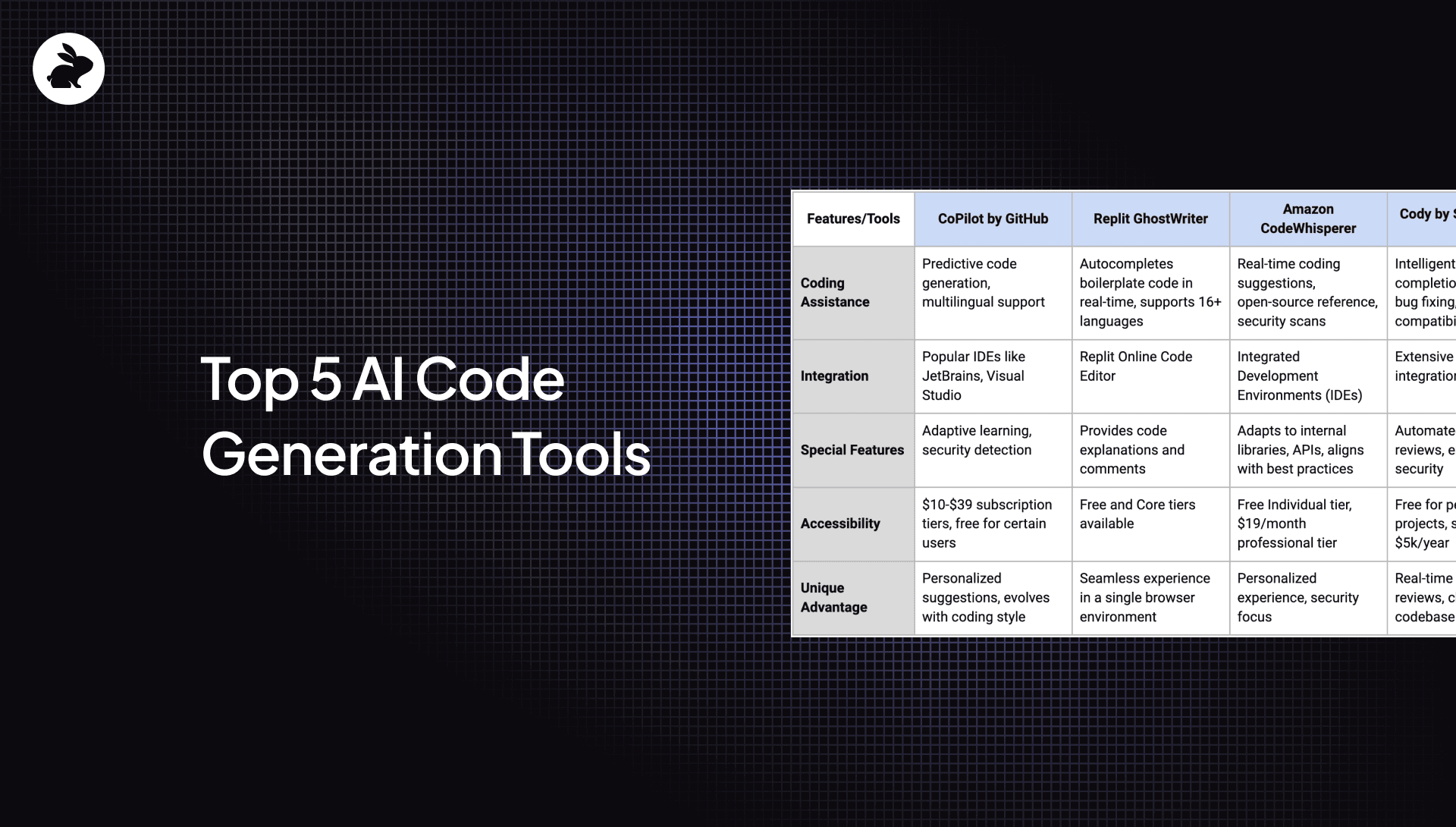
Developed in collaboration with OpenAI, CoPilot by GitHub is a transformative code generator leveraging advanced language models like OpenAI's GPT-3 and Codex. It serves as more than just a coding assistant — it’s a virtual partner in programming. Here are its standout features:

  • Seamless Integration with popular IDEs: CoPilot sets itself apart with its integration into widely-used IDEs such as JetBrains, Neovim, Visual Studio, and Visual Studio Code. This integration facilitates a smooth coding experience, aiding in writing code, understanding complex codebases, and debugging.

  • Predictive code generation: At the heart of CoPilot's functionality is its predictive code generation, suggesting whole lines or blocks of code. This feature greatly accelerates the development process and is enhanced by its multilingual capability, thanks to training on a variety of public code repositories, which allows it to support numerous programming languages effectively.

  • Adaptive learning and security detection: GitHub’s Copilot doesn’t just follow a set pattern; it learns and adapts to individual coding styles, making its recommendations more personalized and accurate. It also includes the ability to detect security vulnerabilities, adding an extra layer of utility and safety to its coding assistance.

Copilot is available in three subscription tiers, ranging from $10 for individuals to $39 for enterprises. It also offers complimentary access for students, teachers, and open-source project maintainers, making it accessible to a wide range of users.

2. Replit GhostWriter

Replit GhostWriter is an innovative tool designed to help programmers craft efficient, high-quality code. Here are its top three features that really make it stand out:

  • Real-Time Coding Capabilities: GhostWriter shines with its ability to autocomplete boilerplate code in real time as you type. This feature streamlines the coding process, making it faster and more efficient.

  • Seamless Integration with Replit Online Code Editor: The tool is flawlessly integrated into the Replit online code editor. This allows coders to write, execute, debug, and collaborate on code within a single, browser-based environment, greatly enhancing the overall coding workflow.

  • Support for Over 16 Programming Languages: GhostWriter is versatile, supporting a wide range of programming languages, including Python, JavaScript, Ruby, and more. This versatility is coupled with the ability to provide code explanations and comments, aiding developers in understanding and improving their code.

Available in both Replit's Free and Core tiers, GhostWriter caters to various coding needs with both limited and advanced model options.

3. Amazon CodeWhisperer

Amazon’s CodeWhisperer is a machine learning-powered service designed to assist developers in improving their productivity. By analyzing comments written in natural language and the existing code within an integrated development environment (IDE), CodeWhisperer offers relevant code recommendations.

The key features that set it apart include:

  • Open-source: References suggestions from open-source data, granting easy access to relevant project repositories and licenses.

  • Real-time interaction: Offers real-time coding suggestions, from concise snippets to complete functions, leveraging insights from billions of lines of code.

  • Enhances security: Excels in identifying potential security vulnerabilities by using built-in security scans (detecting issues like exposed credentials and log injection). It provides instant solutions to these issues and aligns with top-tier security practices.

For those seeking a more personalized coding experience, CodeWhisperer is adaptable to your unique requirements. It aligns with your internal libraries, APIs, and established best practices for more relevant code suggestions. Besides improving code quality, CodeWhisperer also speeds up the onboarding process of new developers by providing suggestions and resources that match your organization's standards.

CodeWhisperer offers a free Individual tier, which includes comprehensive features like code suggestions, reference tracking, security scans, and conversational coding with AWS’ AI-powered assistant Amazon Q. For professional use, it’s available at $19 per month.

4. Cody by Sourcegraph

Powered by Claude 2, Cody by Sourcegraph offers a comprehensive suite of features to enhance the coding experience. What sets Cody apart is its deep integration with the codebase it works with, providing intelligent, context-aware suggestions that go beyond mere code completion. It's all open source.

Cody uses a blend of Large Language Models (LLMs), Sourcegraph search capabilities, and extensive code expertise to achieve a seamless coding experience.

Notable features of Cody by Sourcegraph include:

  • Intelligent code completion: Cody's AI predicts and offers relevant code snippets as you type, streamlining the coding process and boosting efficiency.

  • Automated code reviews and bug fixing: Cody excels at identifying potential bugs and suggesting fixes, greatly reducing debugging time and improving overall code quality.

  • Universal compatibility: Cody is designed to operate across all programming languages, making it a versatile tool for global business needs.

  • Enhanced security: With strong AWS encryption and adherence to SOC II database privacy standards, Cody ensures your data remains protected.

Cody stands out for its ability to offer real-time code reviews, automated bug detection, and solutions, all while functioning seamlessly within your existing tech stack. Its chatbot feature, with full knowledge of your entire codebase, provides tailored code writing and refactoring based on natural language instructions. Additionally, Cody is also able to generate unit tests and documentation with a deep understanding of the entire codebase.

Cody is also convenient. It offers a convenient extension for VS Code, serving as an efficient coding assistant seamlessly integrated into the IDE. For personal projects, individual developers can access Cody without charge. With Sourcegraph, Cody starts at $5k/year.

5. Cursor

Cursor stands out for its integration of AI directly into the code editing process, facilitating a unique pair-programming experience with AI. It doesn’t just generate code; it changes how developers interact with their projects and boosts their productivity.

The AI-powered code editor also enhances the development workflow with a range of innovative features.

Prominent Features of Cursor:

  • AI-generated code and editing: Offers advanced code generation capabilities, helping you code faster and with fewer errors

  • AI assistance in terminal and lint fixes: Streamlines your workflow with AI-powered debugging and automatic lint fixing

  • Codebase-aware chatbot: Provides helpful, context-aware interactions, offering insights and tailored answers directly related to your repository

  • Simple migration and privacy options: Easy migration from VS Code with a one-click setup and options for private code to maintain confidentiality

  • Free plan available: Accessible with a complimentary plan that includes AI-powered code editor and private data controls

Cursor is not just another code editor; it’s a comprehensive AI assistant that understands your codebase and interacts intelligently with your projects. It streamlines and simplifies the coding process, whether you’re generating code from simple prompts, assisting in debugging, or providing direct references and documentation within the editor. Cursor effortlessly integrates with existing workflows, with emphasis on privacy and ease of use. Developers can subscribe to one of three tiers: Free, Pro ($20/month), or Business ($40/seat/month).

The impact of AI is just beginning

We've just scratched the surface with a few standout examples, but there's a lot more. AI code generators are just the beginning. There are countless other AI tools out there transforming how we code. As technology advances, we’re likely to see even smarter AI tools emerging. Their sudden popularity is changing how coding is done, making it into a more streamlined, error-proof process, opening doors for everyone, from coding wizards to beginners

CodeRabbit is revolutionizing code review and analysis with our advanced AI code review tools. Tailored to complement the top tools in the market, we focus on enhancing and scrutinizing existing code, ensuring quality and efficiency. With our AI-first approach, we're not just following trends; we're setting them. Join us as we push the limits of AI in coding, and see how CodeRabbit can transform your development process.