CodeRabbit logoCodeRabbit logo
特徴エンタープライズカスタマー料金表ブログ
リソース
  • ドキュメント
  • トラストセンター
  • お問い合わせ
  • FAQ
ログイン無料試用を開始
CodeRabbit logoCodeRabbit logo

プロダクト

プルリクエストレビューIDE レビューCLI レビュー

ナビゲーション

私たちについて特徴FAQシステムステータス採用データ保護附属書スタートアッププログラム脆弱性開示

リソース

ブログドキュメント変更履歴利用事例トラストセンターブランドガイドライン

問い合わせ

サポートセールス料金表パートナーシップ

By signing up you agree to our Terms of Use and Privacy Policy

discord iconx iconlinkedin iconrss icon
footer-logo shape
利用規約プライバシーポリシー

CodeRabbit Inc © 2026

CodeRabbit logoCodeRabbit logo

プロダクト

プルリクエストレビューIDE レビューCLI レビュー

ナビゲーション

私たちについて特徴FAQシステムステータス採用データ保護附属書スタートアッププログラム脆弱性開示

リソース

ブログドキュメント変更履歴利用事例トラストセンターブランドガイドライン

問い合わせ

サポートセールス料金表パートナーシップ

By signing up you agree to our Terms of Use and Privacy Policy

discord iconx iconlinkedin iconrss icon

Issue Planner: Collaborative planning for teams using coding agents

by
Priyanka Kukreja

Priyanka Kukreja

February 10, 2026

8 min read

February 10, 2026

8 min read

  • Why we’re taking on planning… (Hint: We see a lot of slop in reviews)
  • The challenge: Planning in the AI era
  • How our Issue Planner works
    • Issue Planner walkthrough
  • How our Issue Planner helps teams
  • But… why Collaborative Planning and prompt reviews?
    • Limitations of planning directly with agents
    • Why we chose Collaborative Planning
  • What’s next? Roadmap for CodeRabbit Issue Planner
  • Get started
Back to blog
Cover image

共有

https://victorious-bubble-f69a016683.media.strapiapp.com/X_721afca608.pnghttps://victorious-bubble-f69a016683.media.strapiapp.com/Linked_In_a3d8c65f20.pnghttps://victorious-bubble-f69a016683.media.strapiapp.com/Reddit_feecae8a6d.png

他の記事を読む

Article Card ImageArticle Card ImageArticle Card ImageArticle Card Image

CodeRabbit Issue Planner を使って Linear 上の Issue を効果的に計画する方法

How to effectively plan issues on Linear with CodeRabbit Issue Plannerの意訳です。 チケットと、意味のあるコードの間にはギャップがあります。チケットには「ダークモードを追加する」と書かれています。それは結構ですが、コード上では実際にどういう意味でしょうか。どのファイルを変更する必要があるのか。コードベースではすでにどのようなテーマ管理のパターンが使われているのか。拡張すべき共通ユーティリティはあるのか。 チケットが示すのは w...

Article Card ImageArticle Card ImageArticle Card ImageArticle Card Image

Misalignment(ミスアラインメント):AIコーディングエージェントの隠れたコストは、AIそのものではない

The hidden cost of AI coding agents isn't from AI at allの意訳です。 TL;DR: AIエージェントの本当のコストは、トークンやツールではありません。手戻り、品質低下、チームの障害として現れる「ミスアラインメント(認識のズレ)」です。 誰もがしている会話(そして、なぜ本質を外しているのか) AIコーディングエージェントに関する多くの議論は、まるで架空のフットボールドラフトのようです。 自律的なコーディングでは、どのモデルが優れているのか ...

Article Card ImageArticle Card ImageArticle Card ImageArticle Card Image

Issue Planner:コーディングエージェントを活用するチームのための共同プラン作成パートナー

Issue Planner: Collaborative planning for teams using coding agentsの意訳です。 何十年もの間、ソフトウェア開発ライフサイクルは変わらぬ流れに従って行われてきました。Issue を作成し、作業を割り当て、手作業でコードを書き、複数の同僚にレビューしてもらい、テストし、リリースします。各ステップにかかる時間と労力は比較的予測可能でした。そして効率化はできましたが、そこには限界がありました。そんな中、 AI コーディングエージェントが...

For decades, the software development lifecycle has followed a familiar timeline. You create an issue, assign the work, manually write the code, get several peers to review it, test it, and ship. Each step took a relatively predictable amount of time and effort. You could find efficiencies but only to a degree. Then, AI coding agents came and exploded that timeline.

At CodeRabbit, we’ve seen firsthand how AI shifted the backlog from writing code to reviewing and testing code. That’s why we launched our PR Reviews product. When AI also created the need to review code locally while working on code with an agent, we launched our IDE and CLI code review tools.

Lately, we’ve been seeing another problem. With coding agents in the loop, writing code is no longer the slowest or most critical part of the process. Planning is. Intent is. Alignment is.

Why we’re taking on planning… (Hint: We see a lot of slop in reviews)

The cost of being even slightly unclear about things like scope, assumptions, or success criteria has huge implications later on in the workflow when agents are involved… like in reviews where we were seeing a lot of slop and rework required 👀. But it also means needing to iterate on prompts until the agent gets it right and extensively reworking generated content.

What’s more, creating effective prompts with the right context and intent is time consuming, creates issues with adoption of AI tools and generates uneven outcomes across teams due to differences in prompting skills and approach. Increasingly, developers are hungry for ways to streamline the planning process and to shift collaboration left by reviewing prompts before code is written.

That’s why we’re launching the beta for CodeRabbit Issue Planner. We’re leveraging the same industry-leading context engine we use in our code reviews to help teams create plans, automate the drafting of prompts, and collaborate to ensure alignment.

The challenge: Planning in the AI era

Today, teams spend more time prompting, re-prompting, and correcting AI-generated code than they ever expected. Prompts have grown longer as developers learned that being more specific helps increase output quality.

Context is a big part of that but it has to be brought in from scattered docs, tickets, and Slack threads. If you don’t take the time to add it, agents make assumptions. Often not the right ones. The same goes with intent. Clear intent is the difference between your agent building the right thing instead of “something.”

The result of these prompting challenges is rework, “AI slop,” and frustration. Good prompting is complicated, time consuming, and hard to do well. It requires:

  • Decomposing ambiguous problems

  • Specifying interfaces and acceptance criteria

  • Providing the right context at the right time

  • Building tight feedback loops

  • Designing for safety (including security, privacy, reliability)

Meanwhile, on any team there’s always some teammates who know how to guide agents well and others who don’t. That creates uneven output quality, more review overhead, and stalled adoption. After all, if you have to rework the code every time because your prompt isn’t specific enough, it often seems like it’s faster to just write the code yourself.

How our Issue Planner works

https://youtu.be/zHlgipben70

Our Issue Planner is a new workflow that happens collaboratively within your issue tracker and helps teams define scope, assumptions, and success criteria together – before any code is written. While other tools have tried to tackle AI planning, they’ve done it in a disconnected way that doesn’t allow for team alignment or doesn’t bring in the right context.

With AI coding agents, planning can no longer live in people’s heads, scattered tickets, or half-remembered conversations. It has to be explicit, shared, reviewable, and machine-readable.

Instead of treating prompting as a solo activity, our Issue Planner turns planning into a collaborative, reviewable step in your SDLC.

Issue Planner walkthrough

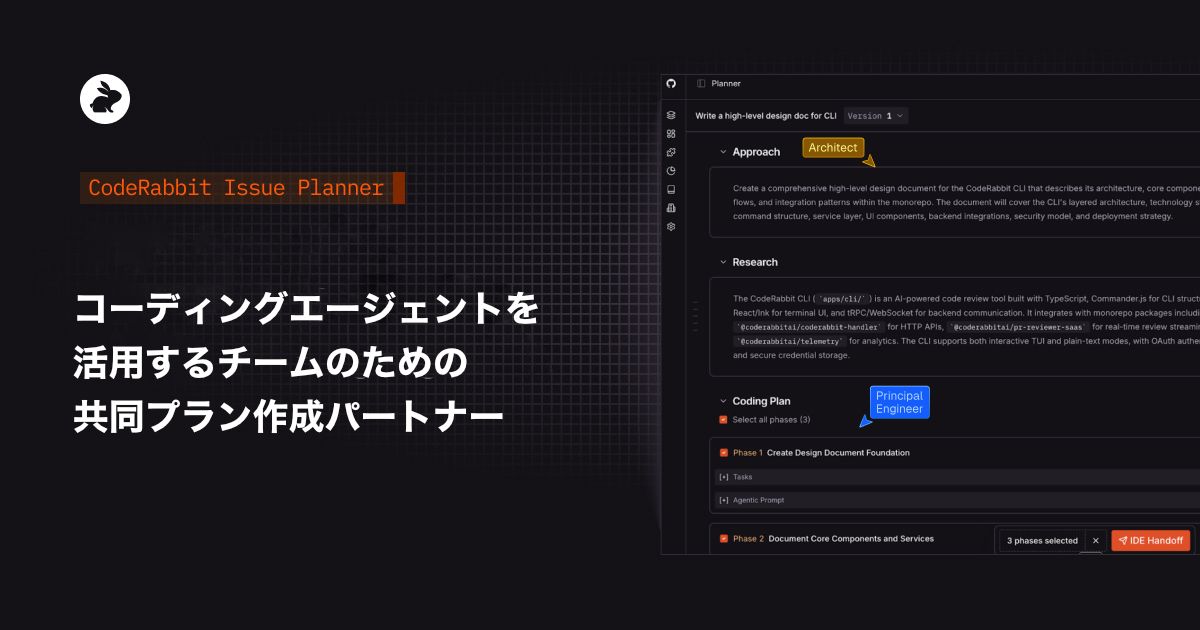
1) CodeRabbit Issue Planner integrates with your issue tracker to help you plan where issues live (currently available in Linear, Jira, GitLab Issues, and GitHub Issues).

2) When an issue is created, CodeRabbit’s industry-leading context engine gets to work. It starts by creating a Coding Plan. That includes:

  • Sharing a high-level overview of how we will research and approach the task.

  • Pinpointing the files that need to change.

  • Breaking complex product requirements into multiple phases and tasks for an AI Coding Agent to create tasks.

  • Enriching each phase and task with context gathered from past issues, PRs, organizational context from tools like Notion, Confluence, and others.

3) This creates an editable, structured Coding Plan and consumable prompt package that can be executed on IDE or CLI tools or shared with a coding agent. You can give feedback, refine the assumptions the tool made, and regenerate the plan.

4) You and your team can review and refine the prompt before any code is written. Versions of the prompt are stored for future reference and use.

5) When ready, CodeRabbit hands off the prompt to the coding agent of your choice.

This process saves you time, automates planning, improves your prompt output, and allows your team to align on intent in order to streamline the rest of the software development lifecycle.

Learn more in Docs

How our Issue Planner helps teams

For the last several months, Issue Planner has been available to select CodeRabbit customers. Teams using it saw immediate improvements.

  • Accelerated workflows: CodeRabbit highlights both what needs to change and how to change it, so teams spend less time orienting themselves and more time actually shipping. Instead of reverse-engineering intent from a ticket or PR, engineers and agents start with a clear plan.

  • Better intent → better output: Agents receive explicit requirements, assumptions, and constraints up front. That clarity translates directly into higher-quality output, code that matches team standards, respects architecture decisions, and solves the right problem the first time.

  • Increased AI adoption: By leveling the playing field around prompting and planning, CodeRabbit makes agents usable for the whole team, not just power users. Less reliance on “AI whisperers,” fewer bottlenecks, and more consistent results across engineers.

  • Reduced rework: Clear plans mean fewer back-and-forth prompt cycles, less cleanup, and fewer PRs that are technically correct but functionally wrong. Teams spend less time undoing AI output and more time moving forward.

  • Less slop: Better planning reduces hallucinations, spaghetti code, and invented requirements. When agents are grounded in real context and agreed-upon intent, output stays focused, readable, and maintainable.

  • Real collaboration: Planning doesn’t happen in isolation. CodeRabbit Issue Planner brings humans into alignment before agents execute. That way, decisions are shared, assumptions are visible, and the whole team agrees on the plan before any code is written.

But… why Collaborative Planning and prompt reviews?

Limitations of planning directly with agents

Many AI coding tools encourage you to plan directly with an agent inside your editor, treating planning as a private, one-to-one interaction between a developer and an AI coding agent. In that scenario, requirements, assumptions, and constraints are only accessible to one person or are loosely implied in a prompt that no one else ever sees. AI coding agents also often don’t have the codebase context needed to create a comprehensive plan.

When planning is rushed, under-specified or lacks proper context, agents do what they’re designed to do: fill in the gaps. The result is often code that looks coherent but quietly drifts from team standards, architectural decisions, or product intent. Without shared visibility or early feedback, misalignment isn’t discovered until a PR review, after time has already been spent generating, fixing, and reworking code.

Why we chose Collaborative Planning

That’s why we chose a different direction: planning that’s collaborative, reviewable, and shared, so teams can agree on intent before agents ever start writing code. Collaborative planning turns intent into a shared artifact the whole team can align on before execution begins.

By reviewing and refining prompts together via prompt reviews, assumptions become explicit, constraints are clarified, and decisions are made deliberately rather than inferred. Agents stop guessing and start executing against clear instructions, producing output that’s more predictable, usable, and aligned with how the team actually builds software.

In this model, prompting is no longer a personal skill for a few power-users. It becomes a team competency that scales, reduces rework, and allows agents to operate more reliably within agreed-upon boundaries.

Another key benefit of planning collaboratively in your issue tracker also means that developers aren’t locked into one agent or editor. They can choose the coding agents that work best for them.

What’s next? Roadmap for CodeRabbit Issue Planner

We’re just getting started with our Issue Planner. We are building additional capabilities that will help developers collaborate more effectively, operationalize strong plans, and compound organizational knowledge over time.

Here’s just two things to look forward to:

  • Deeper collaboration and better prompt review workflows: We’ll be expanding support for more team collaboration directly within Issue Planner, including the ability to add discussion threads, activity and decision logs, and explicit approval checkpoints for plans and prompts. The goal is to make intent review a shared, auditable process, closer to a Google Docs–style collaboration experience than a one-off prompt.

  • Prompt repos that functions as “blueprints” for your code: Our goal is to create a repo of the specs, design choices, and prompts that went into creating your codebase. This will function as a source of truth around the design directions and choices made and allow your team to more easily revisit decisions or tweak files without having to start from scratch.

Get started

CodeRabbit Issue Planner is available today in Linear, Jira, GitLab Issues, and GitHub Issues. Try it now.