When we started working on the CodeRabbit plugin for Codex, the goal was not to package as many features as possible. It was to make one workflow feel natural. A developer asks for review, the agent handles setup and execution, and the feedback comes back inside the same working session.
We wanted that experience to live inside the surfaces where developers are already coding, so review becomes something they reach for in the moment rather than a separate step they have to context switch into.
Getting there required more than writing a short set of instructions. We had to decide what belonged in the plugin, how much of the workflow the agent should own, and how explicit we needed to be about model behavior for the experience to stay reliable.
Start with the workflow
We started with the user outcome, not the package structure. The question was straightforward: what should become easier once the plugin is installed?
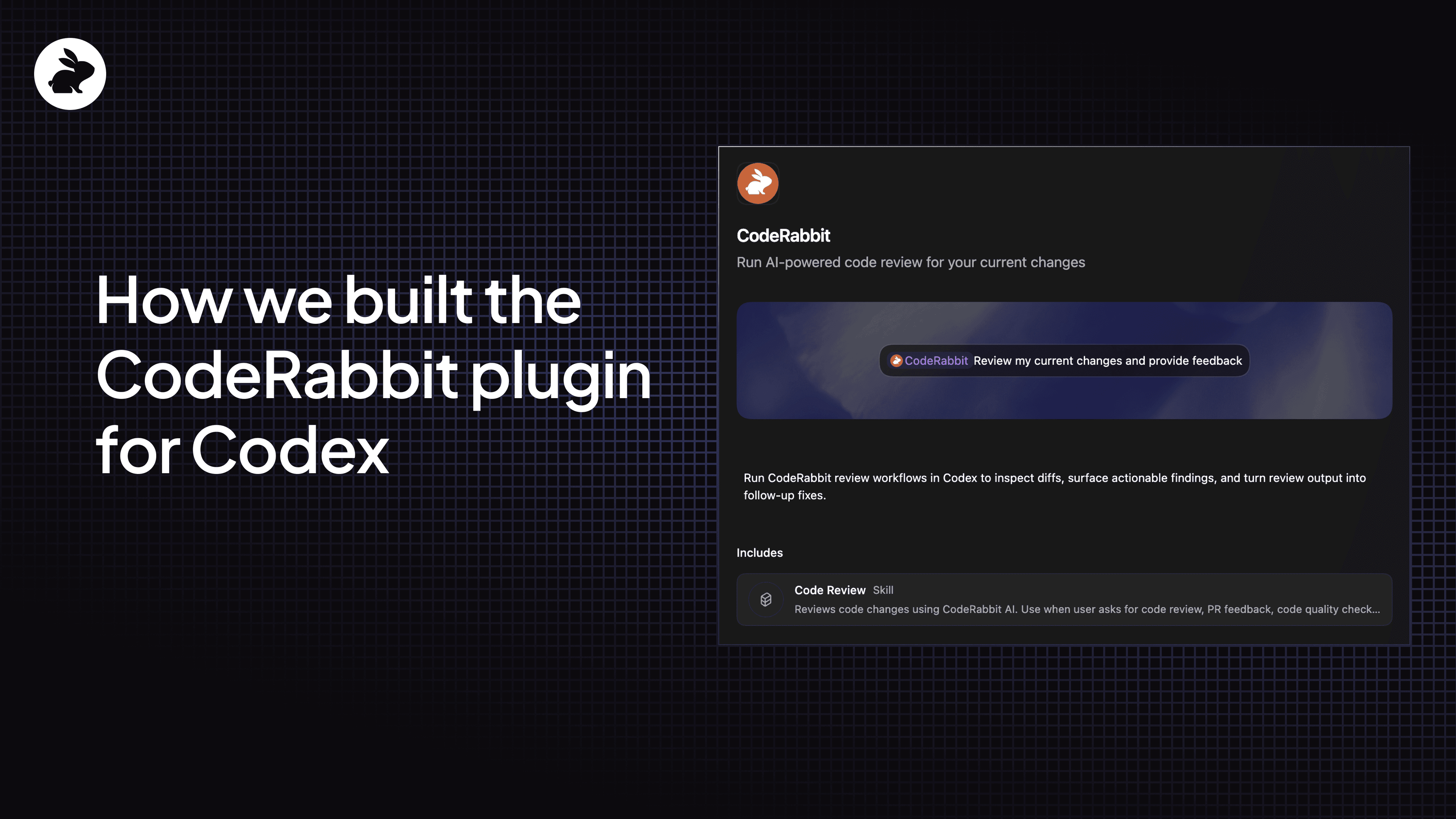
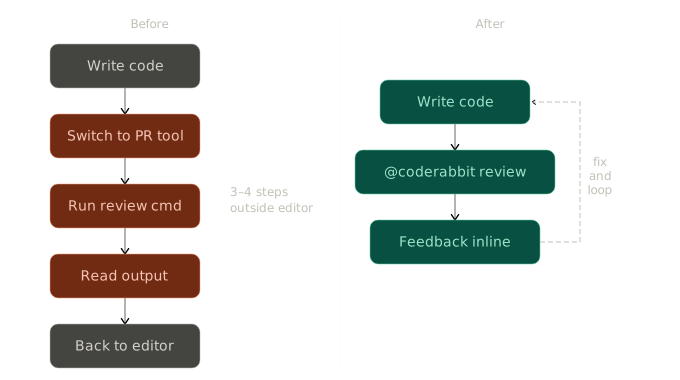
For us, the answer was that code review should feel like part of the coding flow itself. A developer should be able to ask Codex to review the current changes, or use @coderabbit to invoke the plugin directly, and get a useful result without manually checking setup, switching tools, or reconstructing the right review command.
That workflow gave us the shape of the plugin. Instead of designing around a long list of capabilities, we designed around a narrow job to be done and then asked what the agent needed to do that job well. The more of that loop we could keep inside the place where developers were already coding, the more we could reduce context switching, shorten review cycles, and make code changes cheaper to apply.
Build with focused skills
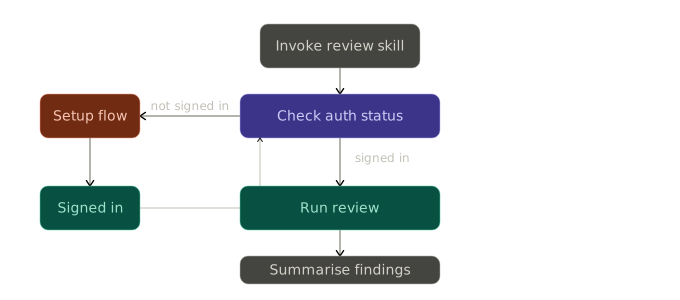
From there, we built focused skills around the core review experience. The code review skill does the heavy lifting. It verifies that the CodeRabbit CLI is available, checks authentication, chooses the right review target, runs the review, and summarizes findings by severity.
Splitting the workflow into focused skills was an important design choice. One giant instruction file might seem simpler at first, but it quickly becomes harder to maintain and harder for the model to use consistently. Focused skills keep the behavior clearer, make iteration easier, and give us a cleaner way to add new workflows over time.
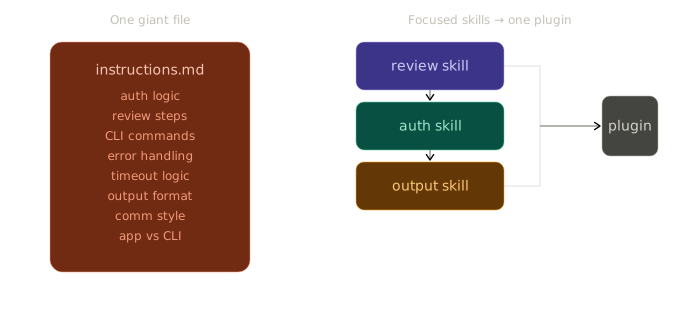
The plugin system's core advantage is that it lets you compile skills, MCP servers, and connectors into a single installable unit. For teams building developer tools or services, that is a meaningful improvement to the experience of the people consuming your work inside the Codex app.
Instead of asking users to discover, install, and remember the name of each individual skill, you can ship everything together in one plugin. The model then decides when to bring each skill into the conversation where it provides the most value. That reduces cognitive load for developers and makes the whole experience feel more intentional.
As we add new CodeRabbit skills for Codex, users get them through the plugin instead of returning to install one skill at a time. A good plugin does not have to be large. It has to make one important workflow easier, then create a clean path to expand from there.
Design for real model behavior
The most important part of the work was not the packaging itself. It was learning how to write skill instructions that guide the model toward the behavior you actually want. Every plugin builder will go through a version of this process, so here are the lessons that made the biggest difference for us.
Be explicit about tool choice. Models are resourceful, and that resourcefulness can work against you if the skill does not set clear boundaries. Early on, we noticed Codex reaching for Python when the workflow only needed a direct CLI command. It would wrap CodeRabbit in a script, add layers around simple terminal actions, or introduce setup steps that were not needed. Once we made the skill instructions specific, telling the model to run coderabbit directly as a bare shell command and not to use Python wrappers, the behavior became consistent. The lesson: if your plugin depends on a particular tool, say so clearly and close the door on alternatives the model might improvise.
Handle authentication as a first class concern. When the CodeRabbit CLI was not yet authenticated, the model would try to solve that on its own rather than following the guided path we had built. It might skip the auth step, guess at credentials, or improvise a workaround that looked reasonable but did not actually sign the user in. We initially tried using the authentication flags that the Codex team provides in their documentation, but in our experience and from the developers testing it, we did not see meaningful changes in behavior when we implemented them. It is possible we configured something incorrectly, but the approach that actually made the difference was handling it ourselves in the skill: check authentication status early and, when the user is not signed in, fall back to a step by step flow that walks them through setup. That one change eliminated most of the unpredictable behavior we were seeing on first runs.
Set expectations for long running tasks. CodeRabbit can take time to analyze a larger set of files, and without guidance the model can interpret that delay as a sign something has stalled. We saw it stop early, retry too quickly, or move into a fallback path before the review had actually finished. The fix was to be explicit about patience in the skill: let the review run, wait through the full timeout window, and only narrow the scope after a genuine timeout rather than treating normal latency as a failure. If your tool has operations that take more than a few seconds, building that expectation into the skill makes a real difference.
Guide communication style. During long tasks, the model tends to narrate every step, repeat that it is still waiting, and send updates that add more noise than reassurance. Users want to know the plugin is working, but they do not want a stream of status messages competing for their attention. We addressed this by telling the model to stay quiet during reviews and only speak when user input is needed, the review is complete, or an error requires attention. The result was a calmer, more professional experience that users consistently preferred.
Design for both the app and the CLI. We initially built the plugin for the Codex app, and when we moved to testing it in the CLI we noticed different patterns emerging. One of the major benefits of the Codex app is its ability to render UI directly. Codex can display markdown, tables, and richer formatting that makes review findings easy to scan. But the CLI does not render tables or more complex UI components the same way, and what looked clean in the app became harder to read in the terminal. We had to go back to simpler primitives to make sure the output worked well in both environments. If you are building a plugin that will run across the Codex app and the CLI, it is worth testing both early and designing your output around the more constrained surface first.
What we would recommend to other builders
If you are building your own Codex plugin, start with the user outcome and work backward from there. Ask what should become easier once the plugin is installed, then define the smallest set of skills that supports that outcome well. The lessons above on tool choice, authentication, patience, and communication style all came from that same process of working backward from the experience we wanted and then writing the skill instructions to get there.
The Codex app includes a create plugin skill that can help you scaffold the structure and get everything set up. It is a useful way to get moving without assembling the pieces from scratch, and it gives you a working starting point that you can iterate on as you learn how the model responds to your specific workflow.
The technical integration is only one layer of the work. The deeper design challenge is deciding what the model should do by default so the experience feels intentional from the first run.
What comes next for CodeRabbit Codex plugin
This first version gives us a base to keep expanding the CodeRabbit experience in Codex. We plan to keep improving how review feedback flows back into the agent, add new skills over time, and continue tightening the first run experience so users reach value faster.
One of the ideas the team is most excited about is exploring how to use not only the context of the code itself but also the conversation context that Codex provides through the messages a developer has exchanged during the session.
That history carries a lot of signal about the intention behind a set of changes, and feeding that into the review could help CodeRabbit deliver feedback that is more aligned with what the developer is actually trying to accomplish rather than reviewing the code in isolation.
If you want to try the plugin, head to the announcement post for installation steps. If you are building your own, we would love to see what you create. Share it with us in the CodeRabbit subreddit or the CodeRabbit Discord.