

CodeRabbit logoCodeRabbit logo
Issue plannerEnterpriseCustomersPricingBlog
Resources
  • Docs
  • Trust Center
  • Contact Us
  • FAQ
  • Whitepapers
Log InGet a free trial
CodeRabbit logoCodeRabbit logo

Products

Pull Request ReviewsIssue plannerIDE ReviewsCLI Reviews

Navigation

About UsFeaturesFAQSystem StatusCareersDPAStartup ProgramVulnerability Disclosure

Resources

BlogDocsChangelogCase StudiesTrust CenterBrand GuidelinesWhitepapers

Contact

SupportSalesPricingPartnerships

By signing up you agree to our Terms of Use and Privacy Policy

discord iconx iconlinkedin iconrss icon
footer-logo shape
Terms of Service Privacy Policy

CodeRabbit Inc © 2026

CodeRabbit logoCodeRabbit logo

Products

Pull Request ReviewsIssue plannerIDE ReviewsCLI Reviews

Navigation

About UsFeaturesFAQSystem StatusCareersDPAStartup ProgramVulnerability Disclosure

Resources

BlogDocsChangelogCase StudiesTrust CenterBrand GuidelinesWhitepapers

Contact

SupportSalesPricingPartnerships

By signing up you agree to our Terms of Use and Privacy Policy

discord iconx iconlinkedin iconrss icon

Code Guidelines: あなたのコーディング規約をCodeRabbitに取り込もう

by
Atsushi Nakatsugawa

Atsushi Nakatsugawa

July 10, 2025

|

1 min read

July 10, 2025

1 min read

  • Code Guidelinesの使い方
  • なぜ重要なのか
  • 今後の展開は?
Back to blog
Cover image

Share

https://victorious-bubble-f69a016683.media.strapiapp.com/Reddit_feecae8a6d.pnghttps://victorious-bubble-f69a016683.media.strapiapp.com/X_721afca608.pnghttps://victorious-bubble-f69a016683.media.strapiapp.com/Linked_In_a3d8c65f20.png

Cut code review time & bugs by 50%

Most installed AI app on GitHub and GitLab

Free 14-day trial

Get Started

Catch the latest, right in your inbox.

Add us your feed.RSS feed icon
newsletter decoration

Catch the latest, right in your inbox.

Add us your feed.RSS feed icon

Keep reading

AI is burning out the people who keep open source alive

AI is burning out the people who keep open source alive

Over the past few months, one refrain has been heard consistently in open source communities: “AI slop.” It shows up in LinkedIn discussions from CEOs who rarely complain publicly. It shows up in Re

CodeRabbit Skills: Give your AI agent code review instincts

CodeRabbit Skills: Give your AI agent code review instincts

AI agents can write code, they can refactor code, they can even explain code. But they don’t review code like a senior engineer. They don’t consistently look for subtle bugs. They miss security risks.

Fix all issues with AI Agents – a quality of life improvement

Fix all issues with AI Agents – a quality of life improvement

Code review is where you catch the things you missed. Fixing them shouldn’t feel like Groundhog Day. CodeRabbit already flags issues in your pull requests and gives you ready-to-use prompts for your AI coding agents. You click Prompts for AI, copy th...

Get
Started in
2 clicks.

No credit card needed

Your browser does not support the video.
Install in VS Code
Your browser does not support the video.

Code Guidelines: Bring your coding rules to CodeRabbitの意訳です。

Cursorや他のAIコーディングツール(使ったことがない人はいないのでは?)を使っている、あるいは試したことがあるなら、その欠点にも気づいているかもしれません。新しいファイルを作成するたびにプロジェクト構成の説明を繰り返さなければならなかったり、UIコンポーネントにshadcn/uiを使っている場合だったり、ビルド時に先にバックエンドの依存コンポーネントをビルドしなければならなかったりと、何かと面倒がつきまといます。

CursorやWindsurf、Copilot、その他のAIコーディングエージェントは、再利用可能かつスコープ付きの指示を各リクエスト時や必要に応じて読み取れることで、こうした問題に対応しました。これは賢明な判断です。

Code Guidelinesの使い方

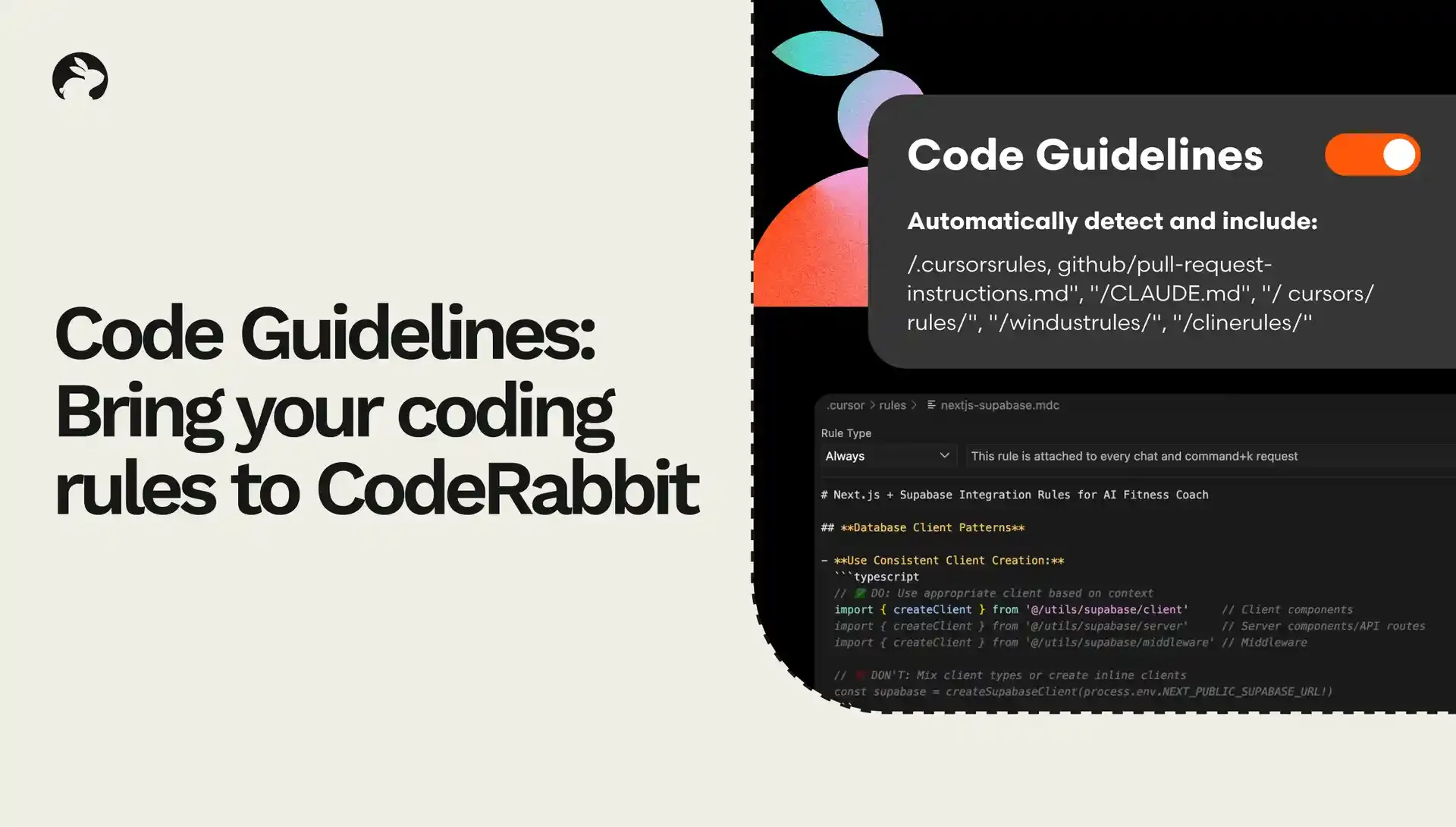
CodeRabbitは、以下のコーディングルールファイルを自動的に検出します。

  • Cursor: .cursorrules

  • GitHub Copilot: .github/copilot-instructions.md

  • Cline: /.clinerules/*

  • Windsurf: /.windsurfrules

  • Claude: /CLAUDE.md

  • その他にも対応しています

Code Guidelinesを使えば、これらのルールがすべてのプルリクエスト(PR)レビュー時のコンテキストとして使用されます。

さらに、独自のルールを設定ファイルとして読み込むことも可能です。たとえば docs/STANDARDS.md や team/code-style.txt にガイドラインが記載されている場合、そのパターンを指定するだけでCodeRabbitが自動的に読み取ります。

なぜ重要なのか

この仕組みは非常に大きな意味を持ちます。第一に、AIコーディングエージェントで設定したルールをそのままCodeRabbitでも使えるようになるということです。つまり、コンテキストの切り替えが不要になりますし、同じスタンダードを2度説明する必要もなくなります。

また、CodeRabbitに対して、どのようにPRレビューを行ってほしいか、どのベストプラクティスに従ってほしいかを明確に指定できるようになります。CursorやGitHubなどで定義したガイドラインをCodeRabbitでも活用できるのです。

例えば、以下のようなメリットが挙げられます。

  • スタイルやフォーマットの一貫性を強制できる .cursorrules に「関数はcamelCase、コンポーネントはPascalCase」と書かれていれば、CodeRabbitはレビュー時に違反箇所を指摘します。

  • アーキテクチャパターンの維持が可能になる 好きなファイル構成、モジュールの境界、依存関係ルールなどを一度定義すれば、CodeRabbitはすべてのPRがそれに従っているか確認します。

  • チーム独自のスタンダードを適用できる 例えば「必ずearly returnを使う」「継承より合成を優先する」といったルールも、レビューの一部としてチェックできます。

今後の展開は?

CodeRabbitが優れたPRレビューを行える理由は、強力なコンテキストエンジニアリングにあります。Code Guidelinesは、そのコンテキストの質をさらに高める機能です。今後の展開に関してヒントをひとつだけ言うなら、「コンテキストこそが王者」です。ぜひ今後のアップデートにもご注目ください。

まだCodeRabbitを試していないなら、今が絶好のチャンスです。 無料で始める ことで、コードレビューにかかる時間もバグも半減させましょう。